Day17 of 90daysofdevopschallenge
Aspiring Devops engineer
Building and Deploying a Simple Web App with Docker File📁
Explain Dockerfile
A Dockerfile is a text file that contains a set of instructions for building a Docker image. Docker images are lightweight, standalone, and executable packages that contain all the necessary dependencies and configurations to run a software application.
It tells Docker what base image to use, what commands to run, and what files to include. For example, if you were making a container for a website, the Dockerfile might tell Docker to use an official web server image, copy the files for your website into the container, and start the web server when the container starts.
Instructions that are used in Dockerfile.
Here is the basic syntax and explanation of common instructions in a Dockerfile:
FROM:
Syntax:
FROM <base_image>Specifies the base image to use as the starting point for your docker image such as: ubuntu 20.4
COPY:
Syntax:
COPY <source> <destination>Copies files or directories from the host machine into the Docker image.
RUN:
Syntax:
RUN <command>Executes a shell command within the image during the image build process. It is used to install software, configure settings, or perform any other necessary tasks. For example,
RUN apt-get update && apt-get install -y python3installs Python 3.
WORKDIR:
Syntax:
WORKDIR /path/to/directorySets the working directory for any subsequent instructions in the Dockerfile. It affects the context in which commands like
COPYandRUNare executed.
EXPOSE:
Syntax:
EXPOSE <port>Informs Docker that the container will listen on a specified network port at runtime.
CMD:
Syntax:
CMD ["executable", "arg1", "arg2"]Defines the default command to be executed when a container is started from the image. Only the lastest CMD instruction in the Dockerfile takes effect.
Task:
1. Create a Dockerfile for a simple web application (e.g. a Node.js or Python app)
2. Build the image using the Dockerfile and run the container
3. Verify that the application is working as expected by accessing it in a web browser
FROM python:3.9

WORKDIR app/
COPY app.py .
RUN pip install flask
CMD ["python","app.py"]
#command to build the image
docker build . -t flask-app
#command to run the container
docker run -d -p 5000:5000 flask-app:latest
#To check whether application is working or not paste the publicip:portno. and run it.
docker login
enterusername:
password:
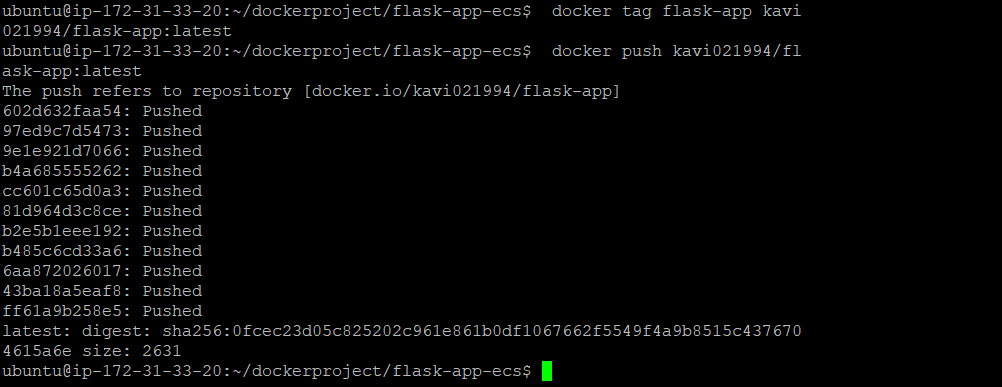
- Push the image to a public or private repository (e.g. Docker Hub)
Conclusion:
Today's task we deployed a simple flask app and push the image to a docker hub.Hope it will help you to clear your concepts. Please share your feedback.
Thank You.
Kavita Pant